
Competition management
Reassign a team
Move a single confirmed team between sibling divisions of the same stage. Useful for fixing registration mistakes, handling appeals, or correcting a wrong tier assignment after seeding.
When to use this
This is the one-team manual move tool: distinct from the bulk Top-N seeding bar used during division splits. Reach for it when:
- An athlete registered for the wrong division and you need to move them to the right one.
- After a split, an organizer-judgement call (appeal, late withdrawal in the upper tier, etc.) means one team should sit in a different tier than where Top-N seeding placed them.
- A team was registered for the wrong division of the qualification stage: same team size, same composition, just the wrong one.
If you need to move many teams at once based on day-1 ranking, use the Top-N seeding bar instead: see the division-splits article.
Step-by-step
- From the dashboard, go to Registrations → Teams and open the team you want to move.
- On the registration detail page, click the "Move to division" button in the header.
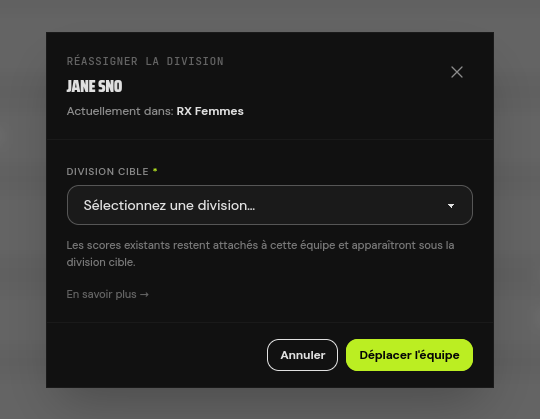
- A modal opens with a dropdown listing only compatible target divisions in the same stage. Pick one and confirm.
- The team is moved. Their existing scores stay attached and will appear under the target's leaderboard for any workouts the target also runs.
Compatibility rules
The dropdown only shows targets that are compatible with the team's current scope. A target is compatible when:
- It belongs to the same competition.
- It has the same team size (you can't move a 2-person team into a 4-person division).
- It has the same composition (gender pattern, e.g. "HH" male-male, "FF" female-female, "HF" mixed). The team's members were validated against the source's composition at registration time and the new scope must keep that constraint compatible.
- It's in the same stage. Moving a team between stages is qualification, not reassignment. That goes through an invitation, which creates a second registration rather than moving the first.
What happens to the scores
Scores are keyed on the registration, not the division. When you move a team:
- All existing scores stay attached. Nothing is deleted; nothing is rewritten.
- Scores for workouts that the target also runs continue to count and appear on the target's leaderboard.
- Scores for workouts the target doesn't include remain in the database but are ignored in scoring and display: they won't pollute the target's standings.
- Move the team back to the original scope and all scores resurface unchanged.
Permissions and constraints
- Only the competition organizer (or a superadmin) can reassign teams.
- Only confirmed registrations can be reassigned. If a team is in any other state (reserved, pending, payment_pending, cancelled), the button doesn't appear: confirm or cancel first.
- There's no automatic notification to the team when an organizer moves them. If you want to let them know, contact them directly.
Related actions
For bulk seeding after a day-1 split, see Division splits mid-event .