
Competition management
Running an online qualifier
The full path from an online qualification stage to a filled finals roster: set up the windows, collect video submissions, review and reveal, then invite the top teams, with paid finals registration handled by the invitation link.
How a qualification stage is structured
Your event is a list of stages. A qualifier is simply the first one, set to run online. It holds its own divisions, each with a price, a registration window, a submission window, a participant limit and a team composition: exactly like the divisions in your final. A finals division then names one of them as its source and claims a rank range from its leaderboard. The classic pattern is one online division feeding two finals divisions: RX takes ranks 1–15, Intermediate takes 16–30.
Once a division has a qualification source, its public Register button disappears, replaced by a lock: "Qualifier required · Top 15". Athletes register (and pay) for the earlier stage; the finals division fills through invitations only.
Set it up
- Pick "Online qualifier, then final" in the creation wizard and you already have both stages. On an existing event, use "Add a stage" at the bottom of the sidebar, pick "Online", then drag the new stage above your final.
- Add a division to the online stage: name, composition, price, registration window, submission window, optional participant limit. Then open each finals division and add that division as a qualification source with its rank range. One source can feed several finals as long as their ranges tell them apart, and one final can draw from several sources (three regional qualifiers into one national final, each with its own range).
- Build the workouts on the online stage's Workouts page and assign them to its divisions. Keep the workout content hidden until your announcement: the reveal switch is independent of the submission window.
During the submission window
While the window is open, team leaders submit a score, a video link, and optional notes for every workout part. Submissions arrive as pending and don't count toward the leaderboard until you approve them.
Review as they come in rather than batching everything at the deadline: the division's info card in the Leaderboard section tracks the window countdown and the approved / pending / rejected / missing counts, so you always know how much review work is left. The full review flow (approve with corrections, reject with a note, reinstate) is covered in Score entry and leaderboards .
Reveal the results
The stage's leaderboard stays hidden from athletes until you reveal it: you always see live standings on the dashboard. Finish your reviews, settle any disputes, then flip the reveal toggle. Athletes see their final rank, and the leaderboard states which direction wins under your scoring method.
Invite the top teams to finals
Open the Invitations tab in the finals stage and switch to "From a source" mode (available once the target division has a qualification source). You get the source division's leaderboard with divider bars drawn at that edge's cutoff ranks and each team's invitation status as a badge. Select the teams and send: invitations go out in one batch. With several sources, you work through them one at a time; ranks from different sources are not comparable.
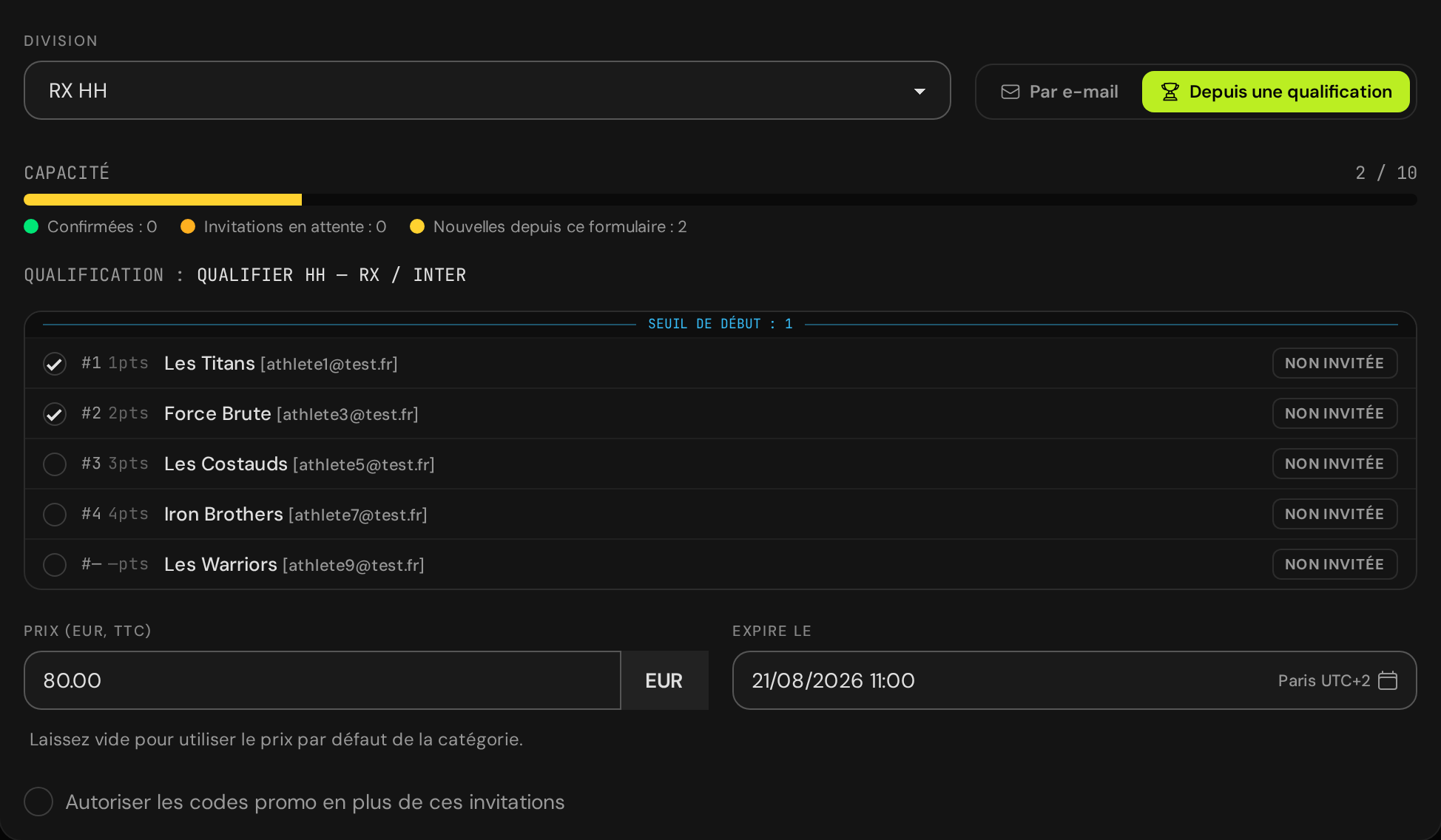
- Each invitation email carries a unique registration link, valid for 14 days by default: the expiry can be set per invitation.
- The price defaults to the finals division's price; you can override it per invitation, or let an invitation bypass the participant limit for special cases.
- The capacity bar keeps you honest: confirmed registrations, pending invitations, and the batch you're about to send, stacked against the division's participant limit.
When a team registers through their link, the invitation is marked accepted and their finals registration is created: a fresh registration, so the roster can change between stages. The public team page groups a team's results from every stage onto one page.
Common questions
Do qualification scores carry into the finals?
No. Each division's leaderboard starts from zero: the earlier standing only decides who gets invited. If you want day-1 results to seed later rounds inside one stage, that's a division split, not another stage.
Can someone enter the finals without playing the qualification stage?
Yes, at your discretion: use the Invitations tab's "By email" mode to invite anyone directly, with a custom price (or free entry) and a capacity bypass if needed. There is no public path around the lock.
What happens to teams that never respond?
You can resend an invitation email from the tab, and invitations past their expiry are marked expired automatically. Track pending / accepted / expired states there, and hand freed spots to the next ranks.